
Overview
How Merxian works
A transaction is the payable record. Checkout sessions and payments collect it. Webhook events tell you the result.
On this page
The resource model#
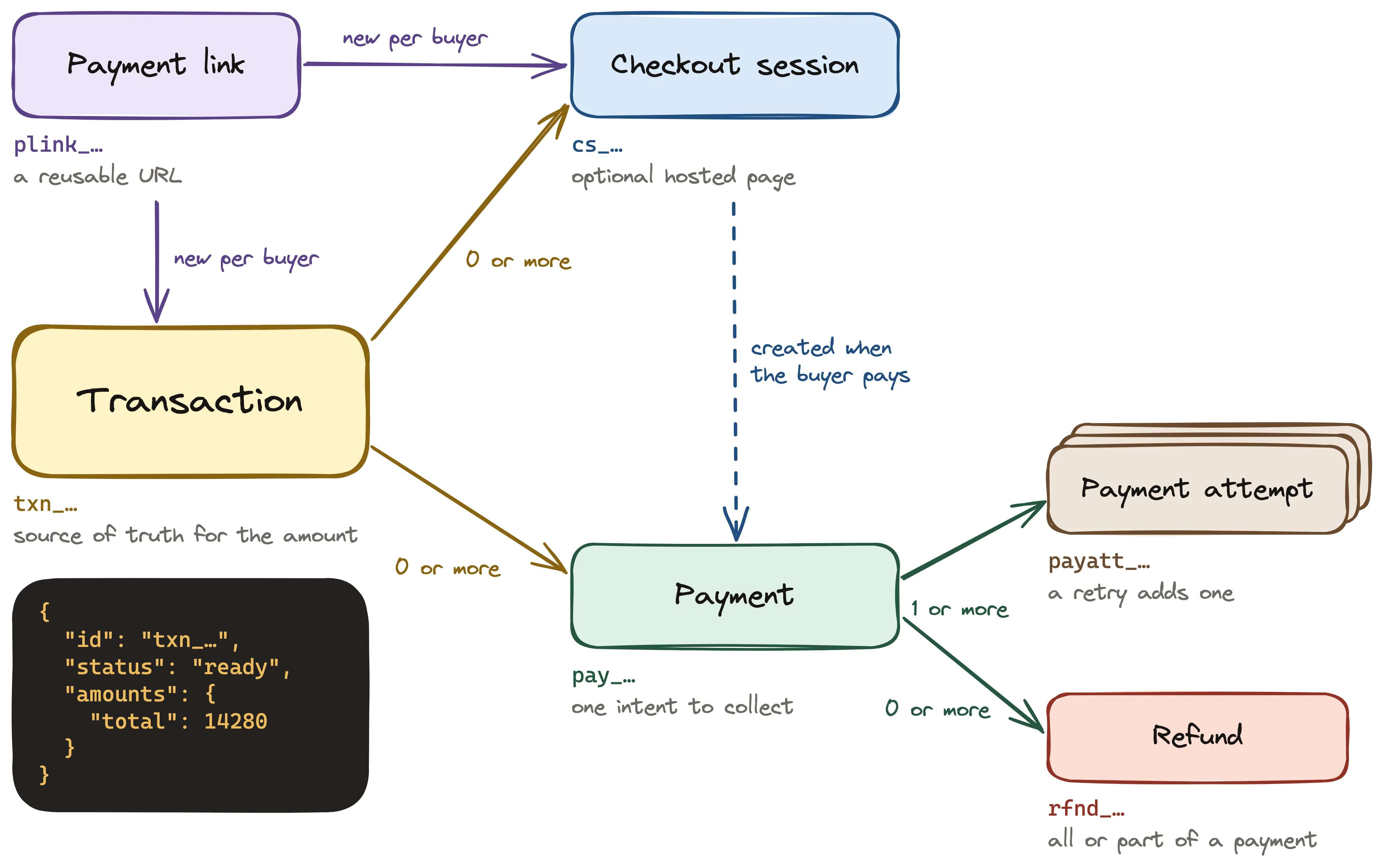
The public resources and their ID prefixes. The table below describes each one.
| Resource | What it is |
|---|---|
| Transaction | The payable record of a sale: lines, buyer, amounts, and tax. It is the source of truth for the amount. |
| Checkout session | A hosted page where one buyer pays one transaction. It is a buyer interface, not a financial record. |
| Payment | One intent to collect money for a transaction. |
| Payment attempt | One try to complete a payment. A retry adds an attempt to the same payment. |
| Refund | A return of all or part of a payment. |
| Payment link | A reusable URL. Each buyer who opens it gets a new session and a new transaction. |
Every payment belongs to a transaction. A checkout session is optional: it is one way to collect a transaction.
The amount comes from the transaction#
Each line of a transaction names a catalog price. You create products and prices in the dashboard. A line cannot carry its own unit amount or description. Merxian calculates the discount and the tax from the prices and the buyer details. A transaction without lines carries only an amount. An account where Merxian calculates tax must use lines.
When you finalize a transaction, Merxian freezes its amounts, buyer, and lines, and the state changes from draft to ready. After that, the payable amount does not change, except through an adjustment. Checkout sessions and events show copies of these amounts. The transaction holds the authoritative values.
A hosted checkout payment#
- The buyer starts checkout on your site.
- Your server creates a checkout session with the catalog prices.
- Merxian returns the session and the
urlof its hosted page. - Your server redirects the buyer to that URL.
- The buyer enters payment details on the Merxian page.
- Merxian redirects the buyer to your
successUrl. - Merxian sends events such as
payment.succeededto your webhook endpoint.
What is synchronous and what is not#
An API response tells you what Merxian recorded. It does not always tell you the final result.
| Step | Response | Final result |
|---|---|---|
| Create or finalize a transaction | Synchronous. The response has the new state. | Known at once. |
| Create a checkout session | Synchronous. The session is open. |
The payment result arrives later. |
| Payment on the hosted page | Not an API call of yours. | payment.succeeded or payment.failed. |
| Refund a payment | 202. The refund is requested. |
refund.succeeded or refund.failed. |
Read Asynchronous results for the full rules.